Targeting a Listener
Invoke Event has an Optional Target pin.
- Empty: every listener registered for the event is called.
- Set: only the listener registered by that object is called.
What counts as "the object"
The target is compared with the object that called Register Event. In Blueprint that is the Blueprint the Register Event node is in (self). In C++ it is the first argument (WorldContextObject).
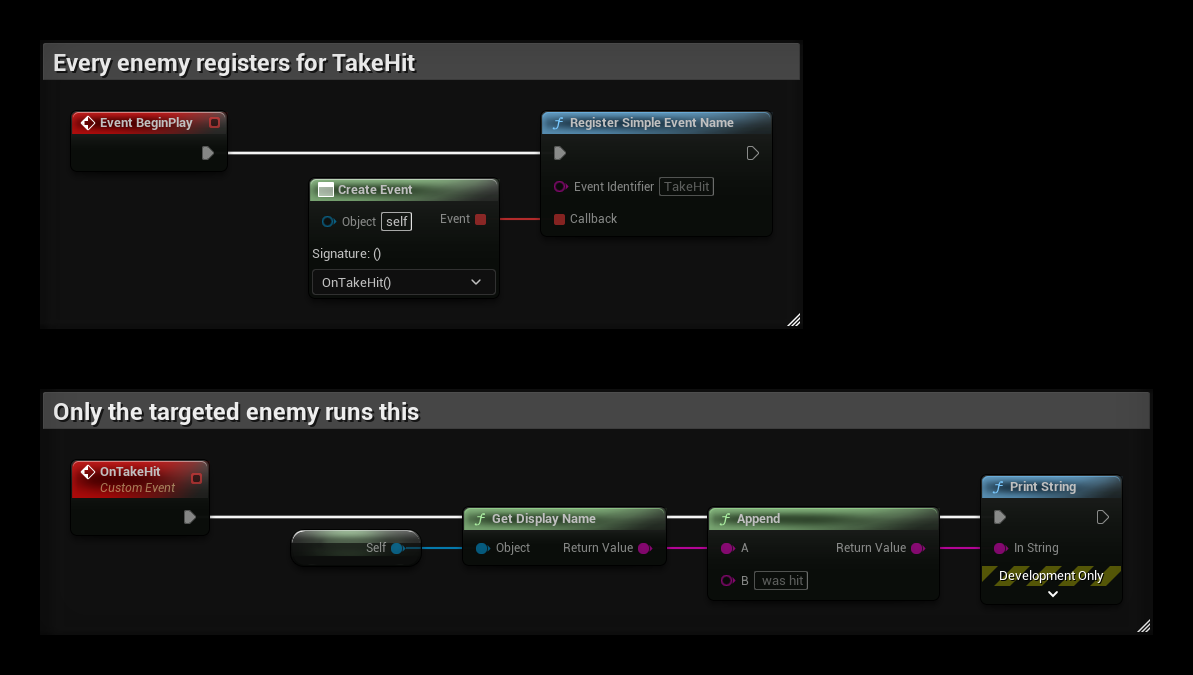
For example, with ten enemies that each register for Event.Enemy.TakeHit on BeginPlay, you can hit one of them by invoking Event.Enemy.TakeHit with that enemy as Optional Target.
Each enemy registers itself, and its callback prints the enemy's name:
The sender passes the enemy it wants to reach:
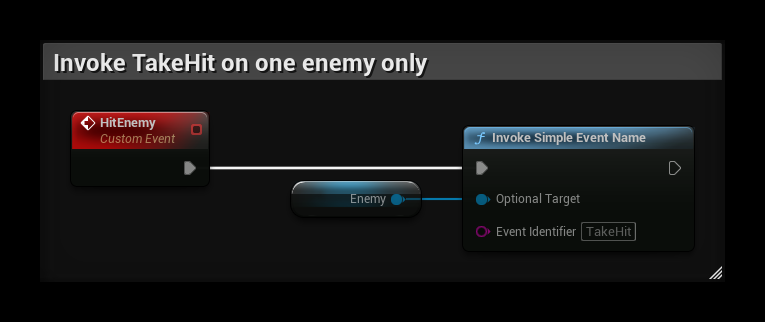
Only that enemy prints its message. The other nine are not called.
These screenshots use the deprecated named nodes. Register Event and Invoke Event work the same way: only the tag replaces the name.
If the event was registered by a different object than the one you pass as target, for example a component registered on behalf of its owner, the target does not match and nothing is called.
Targeting instead of per-instance event names
Targeting replaces events whose names were built per instance, such as "TakeHit_" + EnemyID. Use one tag for all instances and pass the instance you want as Optional Target.