Using Events
Every event has two sides: a listener that registers a callback, and a sender that invokes the event. They only share the event's identifier.
Registering an Event
In the Blueprint that should react to the event, call Register Simple Event (for example on BeginPlay). Select your identifier and connect a Custom Event to the Callback pin.
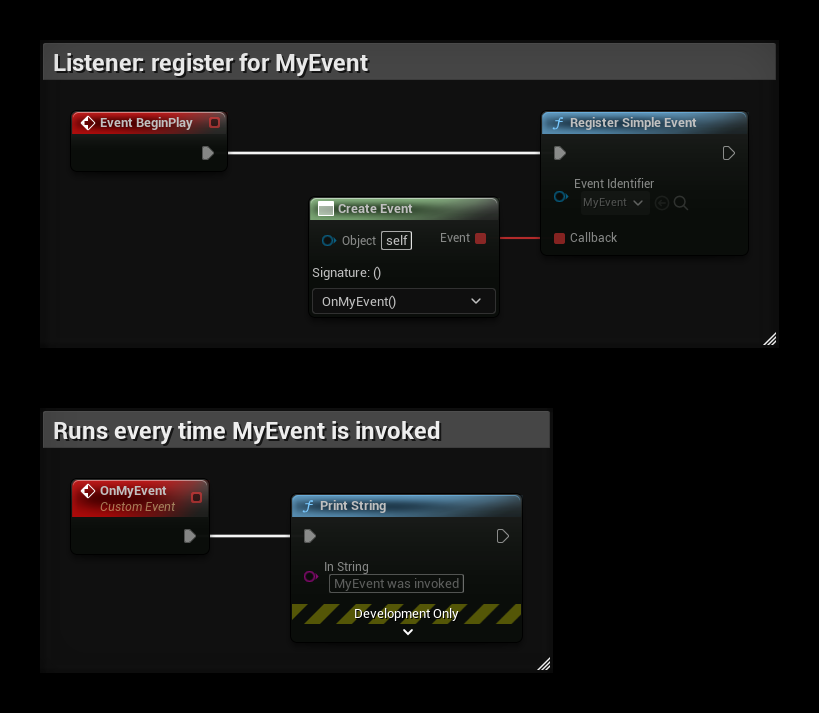
The listener stays registered until it is unregistered or destroyed.
Invoking an Event
From any other Blueprint, call Invoke Simple Event with the same identifier.
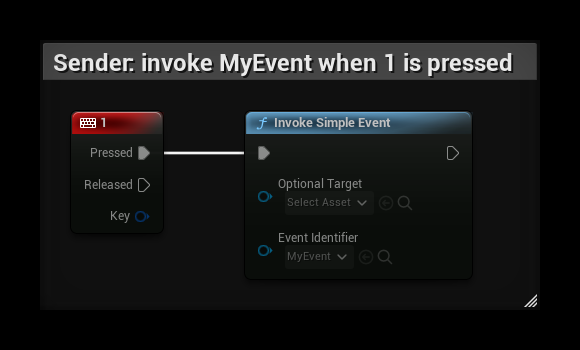
Every listener registered for MyEvent now runs its callback.
By default, an invoked event is queued and the callbacks run a moment later (on the next poll, normally the next frame), not inside the Invoke call. See Dispatching and Timing if you need them to run immediately.
The Invoke nodes also have an Optional Target pin. Leave it empty to reach every listener, or see Targeting a Listener.
Using a name instead of an identifier
Every node has a Name variant, for example Register Simple Event Name and Invoke Simple Event Name, that takes a text name instead of a Data Asset. A listener registered with a name is only reached by an invoke with the same name. See Identifiers vs. Names.
Sending data with an event
A Simple event carries no data. To send a value, use one of the typed events (String, Int, Float, Bool, Vector, String + Float, String + Int), or send any object as a payload. See Event Types.